> For the complete documentation index, see [llms.txt](https://docs.ndi.video/all/llms.txt). Markdown versions of documentation pages are available by appending `.md` to page URLs; this page is available as [Markdown](https://docs.ndi.video/all/using-ndi/ndi-tools/ndi-tools-for-windows/discovery.md).
# Discovery
Updated as of Version 6.2
**NDI Discovery** is a tool that enables you set up and manage Discovery Servers within workflows. We cover the capabilities of [Discovery Service](/all/getting-started/white-paper/discovery-and-registration/discovery-server.md) in depth in our [White Paper](/all/getting-started/white-paper.md).
{% hint style="info" %}
Download NDI Tools [here](https://ndi.video/tools/download/).
{% endhint %}
{% hint style="info" %}
Looking for **Discovery Service?** Download it [here](https://ndi.video/tools/discovery-service/).
{% endhint %}
***
## **Accessing NDI Discovery**
[Install NDI Tools](/all/using-ndi/ndi-tools/installing-ndi-tools.md). After installing it, access NDI Discovery from the [NDI Launcher](/all/using-ndi/ndi-tools/ndi-tools-launcher.md) or your applications folder.
Once you've installed Discovery check out our [Getting Started with Discovery](broken://pages/elFp7Nzh5PxnHpuj2ze2) guide. For high level introduction on how Discovery works read [this guide](/all/developing-with-ndi/developer-guides/receiver-discoverability-monitoring-and-control-overview.md) on Receiver Discoverability, Monitoring, and Control.
***
## **Senders**
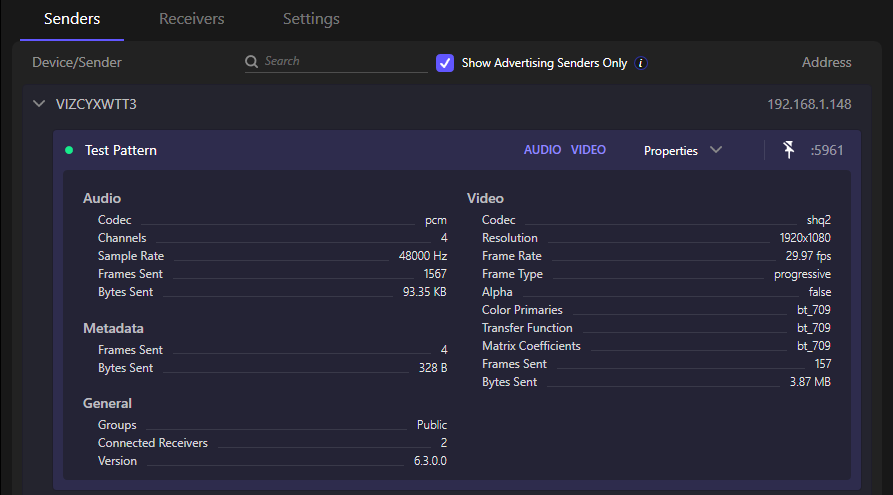
Displays all NDI sources (“senders”) that have registered with the Discovery Server. Each sender entry shows its device name/hostname, the network address, and port it is streaming from. Devices appear grouped by hostname. This tab helps you quickly see which NDI devices are currently available to provide streams on your network.
As of **NDI 6.3**, this view also includes senders registered using the new NDI Sender Advertiser APIs. These APIs extend discovery support to senders, coexist with the legacy advertisement system, and enable improved visibility into sender properties and events when used with the Discovery Server.
## **Receivers**
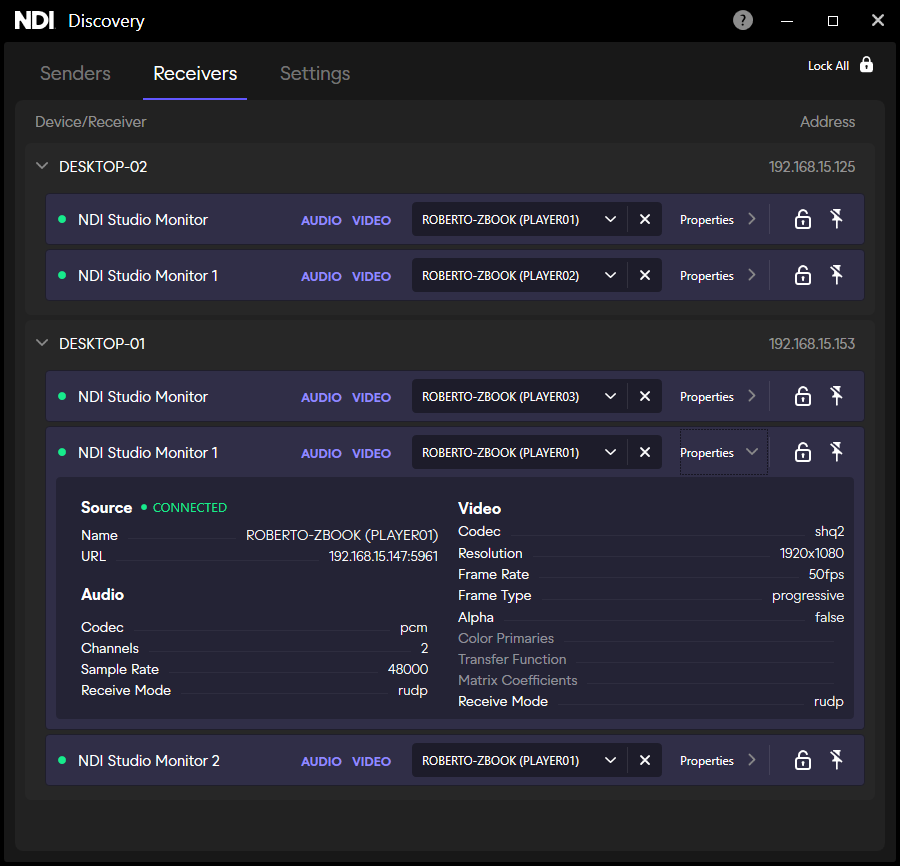
Shows all NDI receivers (endpoints listening for NDI streams) recognized by the Discovery Server. Devices are also grouped by hostname under receivers. This is especially useful when troubleshooting or confirming which machines are actively listening for NDI streams.
{% hint style="success" %}
From the dropdown carrot under **Receivers** you can specify the source for that receiver
{% endhint %}
## **Settings**
You can configure or change the Discovery Server IP and port. You can also see whether the application is connected to a Discovery Server and at which IP/port.
For first time set up, when using with [Studio Monitor](/all/using-ndi/ndi-tools/ndi-tools-for-windows/studio-monitor.md) for the first time be sure to select the **Allow Receiver Advertising** and **Allow Receiver Control** from the settings
---
# Agent Instructions
This documentation is published with GitBook. GitBook is the documentation platform designed so that both humans and AI agents can read, navigate, and reason over technical content effectively. Learn more at gitbook.com.
## Querying This Documentation
If you need additional information that is not directly available in this page, you can query the documentation by asking a question.
Perform an HTTP GET request on the following URL with the `ask` and `goal` query parameters:
```
GET https://docs.ndi.video/all/using-ndi/ndi-tools/ndi-tools-for-windows/discovery.md?ask=&goal=
```
`ask` is the immediate question: it should be specific, self-contained, and written in natural language.
`goal` is what the user is ultimately trying to achieve, the reason they need the answer. Sharing it helps GitBook give you a better, more relevant answer. A goal is most helpful when it describes the outcome the user wants rather than restating the question. For example, with `ask=how do I create an API token`, a goal like `automate deployments from our CI pipeline` lets GitBook tailor the answer to that use case.
The response will contain a direct answer to the question and relevant excerpts and sources from the documentation.
Use this mechanism when the answer is not explicitly present in the current page, you need clarification or additional context, or you want to retrieve related documentation sections.