> For the complete documentation index, see [llms.txt](https://docs.ndi.video/all/llms.txt). Markdown versions of documentation pages are available by appending `.md` to page URLs; this page is available as [Markdown](https://docs.ndi.video/all/developing-with-ndi/developer-guides/receiver-discoverability-monitoring-and-control-overview.md).
# Receiver Discoverability, Monitoring, and Control Overview
## Introduction
NDI 6.2 introduces new functionality to all NDI receivers, any device or
application capable of receiving an NDI stream.
This functionality allows NDI Receivers to be discoverable, similar
to how NDI Senders are discoverable on the network. Users can also monitor the Receivers and get information on
the stream they are connected to.
Finally, users can control the Receiver to connect to any
available sources.
## Network Model
A high level overview of how the relevant parts of the system connect together.
## NDI Receiving Device
In the NDI device or application receiving NDI streams, the feature introduced in NDI SDK 6.2 will
be used to create a **Receiver Advertiser** which registers individual receivers.
The Advertiser is responsible for communicating with the Discovery Server
using an IP address configured at the application layer.
## NDI Receiver Inputs
Individual receivers need to be grouped together
to create a **Receiver Input**.
The individual receivers represent the different stream
components of the NDI stream such as video, audio,
and metadata.
This grouping facilitates discoverability, monitoring, and control by allowing users to view and refer to these as distinct
inputs instead of the individual receiver components.
## NDI Discovery Server
While the NDI Discovery Server continues to be available as a command line utility, it is also available as a Windows or Linux service[^1]. This makes it easier to
manage or integrate directly into software applications.
The Discovery Server registers all NDI devices on the network and
collects their information, accessible via the new [NDI Discovery Tool](broken://pages/4E0yRhy4TMEitjwX1GpG) or any
third-party application interfacing to the Service.
It essentially acts as the central broker for all discovery, monitoring, and control.
The Discovery Server is lightweight and can be run on very small, lower end systems.
{% hint style="info" %}
NDI Receivers can only be discovered by the Discovery Server when they are
registered to it. NDI Senders can still be discovered automatically without a Discovery
Server and do not change from existing functionality.
{% endhint %}
## NDI Discovery Tool
This is a Windows and Mac based client application, packaged with
NDI Tools to provide a user-friendly front-end interface for the Discovery Server.
The client allows users to see a list of discovered **Senders** and **Receivers**.
Users can expand the Receivers tab to see monitoring information and select a source for it to connect to.
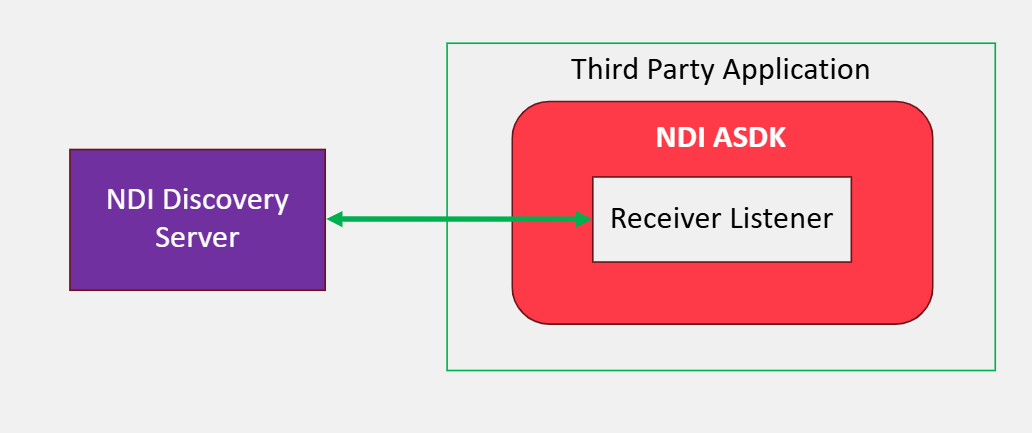
## Third Party Access to Discovery Server
The ability to monitor and control NDI Receivers is available to any third-party developer
via the NDI Advanced SDK.
Using the Advanced SDK, a **Receiver Listener** is created which communicates with the Discovery
Server receiving information about all discovered Receivers and allowing control of them.
## Available Monitoring Parameters
| | |
| ------------------------------ | --------------------------------------------------------------------------------------------- |
| Alpha presence | Indicate whether there is alpha in the stream |
| Audio channels | Number of audio channels present |
| Audio Format | Audio format and codec |
| Audio presence | Indicate whether there is audio in the stream and per channel |
| Audio receive mode | Will indicate the transmission method for the audio stream (SingleTCP, RUDP, multicast etc) |
| Audio sample rate | Will indicate the sample rate for the connected source that has audio |
| Connection state | Will indicate if the receiver is connected/disconnected to a source |
| Frame rate | Frame rate of connected stream |
| Resolution | Resolution of connected stream (width x height) |
| Source name | Name of sender and stream that receiver is connected to |
| Source URL | Will indicate the IP address and Port number for the connected stream (e.g. 192.1.15.11:5961) |
| Video codec | NDI format and codec |
| Video color primaries | Indicates the HDR color information if connected stream is HDR |
| Video frame type | Indicates if the video stream is progressive/interlaced/interleaved streams |
| Video matrix coefficients
| Indicates the HDR color information if connected stream is HDR |
| Video presence
| Indicate whether there is video in the stream |
| Video receive mode
| Will indicate the transmission method for the video stream (SingleTCP, RUDP, multicast etc) |
| Video transfer function | Indicates the HDR color information if connected stream is HDR |
## Control
In this release, it is possible to control the receiver to select which NDI source it connects to.
{% hint style="info" %}
It can only connect to sources that have also been discovered by the Discovery
Server.
{% endhint %}
## Communication and Security
All communications between NDI Receivers, the Discovery Server and NDI Discovery tool,
and third-party applications using the Advanced SDK use XML messages with a basic level
of security.
In this initial release there is no encryption or authentication applied. A Receiver need only
register to the IP of a Discovery Server to communicate with it. Applications must use NDI's propriety API calls provided in the Advanced SDK.
Developers can add authentication at the application layer to prevent unauthorized access
to the application and the ability to monitor or control NDI devices.
[^1]: Runs the Discovery Server automatically in the background, managed by the operating system for startup, monitoring, and restart
---
# Agent Instructions
This documentation is published with GitBook. GitBook is the documentation platform designed so that both humans and AI agents can read, navigate, and reason over technical content effectively. Learn more at gitbook.com.
## Querying This Documentation
If you need additional information that is not directly available in this page, you can query the documentation by asking a question.
Perform an HTTP GET request on the following URL with the `ask` and `goal` query parameters:
```
GET https://docs.ndi.video/all/developing-with-ndi/developer-guides/receiver-discoverability-monitoring-and-control-overview.md?ask=&goal=
```
`ask` is the immediate question: it should be specific, self-contained, and written in natural language.
`goal` is what the user is ultimately trying to achieve, the reason they need the answer. Sharing it helps GitBook give you a better, more relevant answer. A goal is most helpful when it describes the outcome the user wants rather than restating the question. For example, with `ask=how do I create an API token`, a goal like `automate deployments from our CI pipeline` lets GitBook tailor the answer to that use case.
The response will contain a direct answer to the question and relevant excerpts and sources from the documentation.
Use this mechanism when the answer is not explicitly present in the current page, you need clarification or additional context, or you want to retrieve related documentation sections.